How to replace the brake pads on a 1971 Dodge Charger R/T?
Replacing the brake pads on a 1971 Dodge Charger R/T is a crucial maintenance task to ensure safe operation of your classic vehicle. Over time, brake pads wear down due to the friction involved in st…
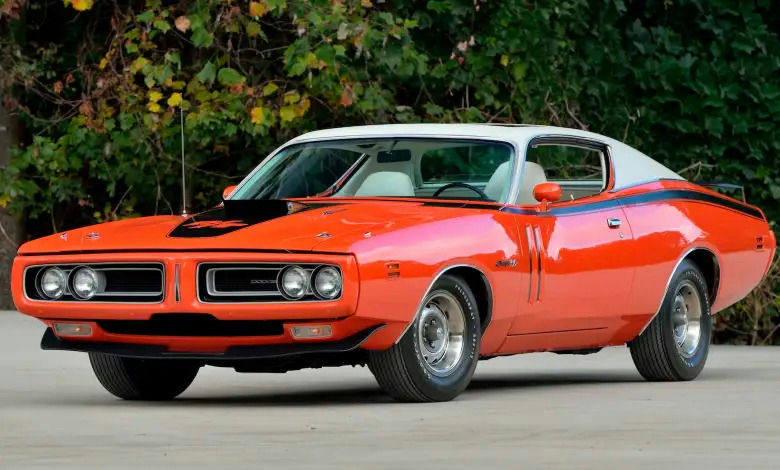
Model: 1971 Dodge Charger R/T
Replacing the brake pads on a 1971 Dodge Charger R/T is a crucial maintenance task to ensure safe operation of your classic vehicle. Over time, brake pads wear down due to the friction involved in stopping your car, and this can lead to decreased braking performance, longer stopping distances, and potential damage to other braking components. Worn brake pads can also make noticeable grinding or squealing noises when you apply the brakes. To restore optimal braking functionality, you need to replace the worn brake pads. Here’s how to solve this issue:
Join the AutoFame community. Become a member for free, add your car to the garage and tell its story. Join AutoFame.
Step 1: Gather Your Tools and Materials
Before starting, ensure you have the necessary tools and replacement parts on hand. You will need:
A car jack.
Jack stands.
A lug wrench.
A C-clamp.
A socket set.
A screwdriver.
New brake pads.
Brake cleaner.
Step 2: Prepare the Vehicle
Locate a flat, stable surface to safely perform the brake pad replacement. Place the car in 'Park' and engage the parking brake. Loosen the lug nuts on the front wheels using your lug wrench, but do not remove them completely yet.
Step 3: Lift the Vehicle and Remove the Wheels
Use a car jack to lift the front of the vehicle off the ground. Insert jack stands under the frame for added safety. Lower the vehicle onto the jack stands and ensure it is secure. Fully remove the lug nuts and then remove the wheels, placing them out of your work area.
Step 4: Locate and Remove the Caliper Bolts
Look at the brake assembly and locate the caliper, which is the component that houses the brake pads. The caliper is secured by two bolts, typically found on the back side of the assembly. Using a socket set, remove these caliper bolts. Be cautious as the caliper will be loose once the bolts are out.
Step 5: Remove the Caliper and Old Brake Pads
Gently lift the caliper away from the brake rotor. You can use a piece of wire or a bungee cord to hang the caliper from the suspension, ensuring there is no tension on the brake line. Slide the old brake pads out of the caliper bracket. They may be a bit snug, so you might need to wiggle them out carefully.
Step 6: Compress the Caliper Piston
With the old brake pads removed, you'll need to retract the caliper piston to make room for the new pads. Place the C-clamp over the caliper piston and tighten it slowly to push the piston back into the caliper housing. Go slowly to avoid damaging the piston.
Step 7: Install the New Brake Pads
Place the new brake pads into the caliper bracket. Ensure they fit snugly and are aligned properly. Some brake pads may come with anti-squeal shims or backing plates; make sure these are installed according to the manufacturer’s instructions.
Step 8: Reattach the Caliper
Once the new pads are in place, reposition the caliper over the brake rotor and align it with the caliper bracket. Reinsert and tighten the caliper bolts securely with your socket set.
Step 9: Reinstall the Wheels
Put the wheels back in place and hand-tighten the lug nuts. Use the car jack to carefully lift the vehicle off the jack stands, then remove the stands and lower the vehicle to the ground. Fully tighten the lug nuts in a star pattern to ensure even pressure.
Have a car with a story like this? Become an AutoFame member and share it with people who love cars as much as you do.
Step 10: Test the Brakes
Before driving, pump the brake pedal a few times to ensure the brake pads are properly seated and the caliper piston is adjusted. This restores the hydraulic pressure in the braking system.
Step 11: Clean Up
Spray the brake assembly with brake cleaner to remove any grease or debris. Make sure all tools and materials are cleared away from the work area.
By following these steps, you can successfully replace the brake pads on your 1971 Dodge Charger R/T, restoring your vehicle's braking performance and ensuring a safer ride.
About AutoFame
AutoFame is a home for people who love cars and the stories behind them. Every car on a show field or in a garage has a history: who built it, who saved it, the road trips, the late nights in the shop and the people who helped along the way. AutoFame gives those stories a place to live, so they are not lost when the hood closes or the car changes hands.
Membership is free. Once you join, you can add your car to your own AutoFame garage with photos, specs and the story only you can tell. Restorations, survivors, daily drivers, race cars and family heirlooms all belong here. Other members can find your car, follow its progress and connect with you over the details that matter to car people.
Beyond member garages, AutoFame publishes stories, guides and features on the cars, builders and history that shape car culture. You will find buying and restoration guides, car parts explainers, special editions, the newest models and the classics that started it all. The AutoFame Gallery puts member cars on display for anyone to browse, and the AutoFame YouTube channel adds owner interviews, show highlights and the conversations that happen around a good car.
AutoFame is also built for the people who run car shows. Organizers use it to manage entries and judging, and judges score each car category by category on their phones, with a written guide for every category so nothing gets skipped. After a judged show, owners can see what their car was scored on and how it compared. Shows across the Texas Gulf Coast have run on AutoFame, including the Moody Gardens Car Show in Galveston, Good Grub and Gears, and Keels and Wheels at Lakewood Yacht Club.
AutoFame was founded by Kevin Brady, whose own life in cars began long before he started building tools for the hobby. The idea is simple: the people who love these cars should have one place to share them, learn from each other and keep the stories going.
Whether you own a show winner, a project that is still in pieces or simply love reading about great cars, there is room for you here.
Be part of the AutoFame community. Join free and become a member today.